Individuate Music Prism

Music Prism

A chord reference that helps you find your voice(ing). Guitar, bass, ukulele, and piano. Beginners get a fast, visual reference for where the fingers go. Intermediate players might explore new voicings or tougher progressions. And skilled players can refresh their memory on how that one scale works in E♭.

Music PrismmacOS, for Mac laptops and desktops

Download for MacLaptops and desktops Visit this page on your Mac to download it. macOS 10.15 or later · No account needed

Where do your fingers go?

When you want to learn music or play an instrument there’s a lot to absorb. Beyond the muscle mechanics of how to move your fingers, and fast enough, there’s the question of where to put them.

Most chord books give you every possible combination. Most software is too complex and offers too many choices. Neither is much use when the instrument is in your hands and you’re wondering, how’s this work again…?

Music Prism is a focused, interactive reference that helps you grok how music works in practice. Change from major to minor and see how the notes move on the fretboard or keyboard. Oh, that’s how a maj7 works. What is a sus4, anyway?

If you’ve ever struggled to understand music while you were practicing it, keep Music Prism open next time.

Sixty chords, drawn on the wall By Music Prism’s own diagram engine, the code that draws them in the app.

The same chord, seven instruments

Guitar, standard and baritone. Bass, four-string and five. Ukulele, standard and baritone. And piano. Learn one instrument, or learn how the notes and chords translate from one to the next.

A chord on the fretboard and the same chord on the keyboard are two views of one thing: the diagrams all come from the same engine. Here, the same C chord, drawn for each of the seven instruments.

3×××RC3E5G
Guitar
8×××RC3E5G
Baritone Guitar
7×5GRC3E
Ukulele
×RC3E5G
4-String Bass
33E5GRC××
5-String Bass
×5GRC3E
Baritone uke
RC3E5G
Piano

What’s inside

Inversions = Voicings

“Inversions” are the different ways one chord can be voiced: the same notes, stacked in another order, in another place. You can play a chord in a lot of spots on the fretboard or keyboard, and which one you reach for depends on where your hand is coming from and where it’s going next in the song.

The standard advice is to learn them all, up and down the neck, in every key. Music Prism gives you a way to work through that methodically, and a reference to come back to as you grow.

Music Prism showing every inversion of a C7 chord on guitar: C7, C7/E, C7/G, C7/B♭, across each adjacent set of strings.
C7 on guitarEvery inversion, across every string set.
The same C7 on the piano keyboard, its four inversions laid out as close-position voicings.
The same C7 on pianoFour inversions in close position.

Chord qualities

How is major different from minor? How do you turn either one into a maj7 or an m7? What’s the diminished shape again? Would sus2 work here, or sus4?

Switch the quality and watch the diagram change under you. Play the shapes on your instrument and let your mind start making the connections. That’s how a chord gets under your fingers.

Music Prism showing a Dmaj7 chord on guitar, redrawn through all eight qualities in turn as the Quality control cycles.
One D chord, eight qualitiesOn guitar, redrawn at each turn.
The same Dmaj7 on the piano keyboard, following the same cycle through all eight qualities.
The same D on pianoThrough the same eight.

What is this chord?

You’re playing around and you find something you like. What is that? Click the notes on a blank fretboard or keyboard and the chord gets named from its intervals, along with any other reading the same notes allow.

For the experts: the lowest sounding note decides between a plain name and a slash chord.

When the chord turns up in one of the app’s progressions, one more click shows it there, in a key where it’s at home.

Music Prism’s Identify view naming a grip marked on a blank fretboard, x x 7 7 5 5, as Asus4, with the alternate reading Dsus2/A.
Asus4, also known as Dsus2/AYou found it by ear at the seventh fret, and now you know what it is.
Identify naming the grip x 7 9 8 9 x as Emaj7, with a button beneath the result reading “See Emaj7 in a progression →”.
Emaj7One click from the ii–V–I in E.

The CAGED map

Standard guitar only

The CAGED map shows how the five open shapes move across the neck. See how they overlap, or highlight one shape on its own. Change the root and watch the chord appear in all five positions. “Play the C chord in the A shape” will finally make sense.

Music Prism’s full-neck CAGED map for C major, showing the five open shapes bracketed across the fretboard, each highlighted in turn.
C major in all five shapesOne at a time, or all together.

Progressions

Sometimes when you’re practicing you’re not playing a song, but you don’t want to just noodle around either. What you want is a progression: the chord sequences songs are built from.

I–IV–V: blues, folk, and early rock and roll ran on little else for decades. iv–VII–III–VI: “Autumn Leaves” in a single breath, and a jazz-standard staple. Thirteen of them are built in, root position or voice-led. Learn a few and you’ll start hearing every song differently.

Music Prism laying out the twelve-bar blues in E major on guitar, as a grid of bars.
The 12-bar blues in ERoot position, on guitar.
Music Prism laying out the I–vi–IV–V progression in G major on piano, each chord voice-led from the one before.
I–vi–IV–V in GVoice-led, on piano.

Scales

Where melody comes from, in three layers: the chord tells you where home is, the pentatonic adds the two notes that turn it into vocabulary, and the full scale fills in the colors.

Rather than one huge chart that’s hard to read and harder to memorize, you add and subtract the layers yourself, so it stays clear what you’re actually looking at.

Music Prism showing the G major scale across the full guitar neck, built up in layers from the chord tones.
G major across the neckBuilt in layers: triad, pentatonic, scale.

Musical keys and the Nashville Number System

When you’re ready, explore keys, and how chords become the numerals of the Nashville Number System (I, ii, iii, IV…), the same in every key. Change the key and every diagram follows, spelled the way that key spells it.

Music Prism with the key set to E♭ minor: the key row, the degree row spelling VI as C♭, and every root chip carrying its roman numeral, above E♭ minor inversions on guitar.
E♭ minorEvery root shows its numeral: the VI chord is C♭.

Made to be printed

Print any sheet, or export it as a PDF. Every view has been tuned to come out as a good-looking, easy-to-read page, with an extra margin on the hole-punch side, so it holds in a binder.

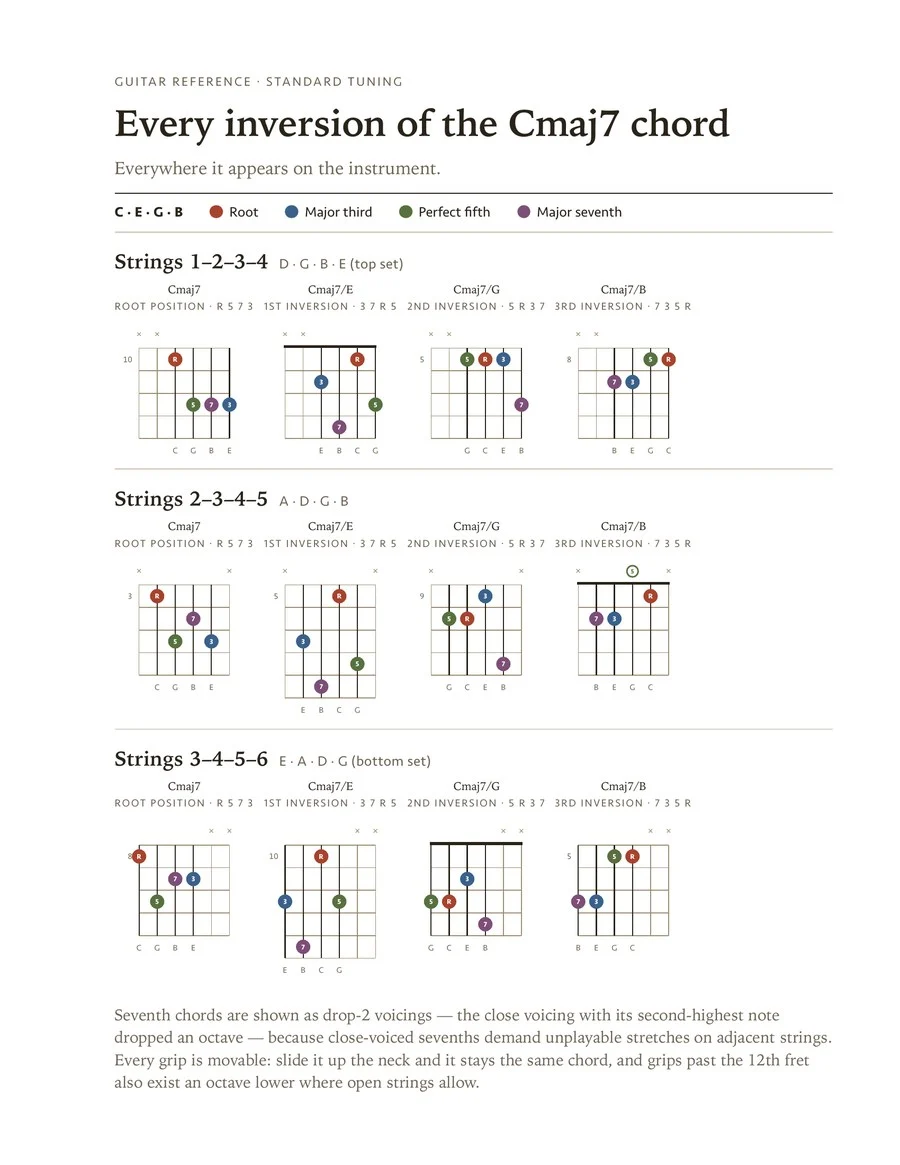
A Music Prism sheet printed from the app: every inversion of Cmaj7 on guitar, across three sets of strings.
Cmaj7 on guitarA sheet printed from the app.
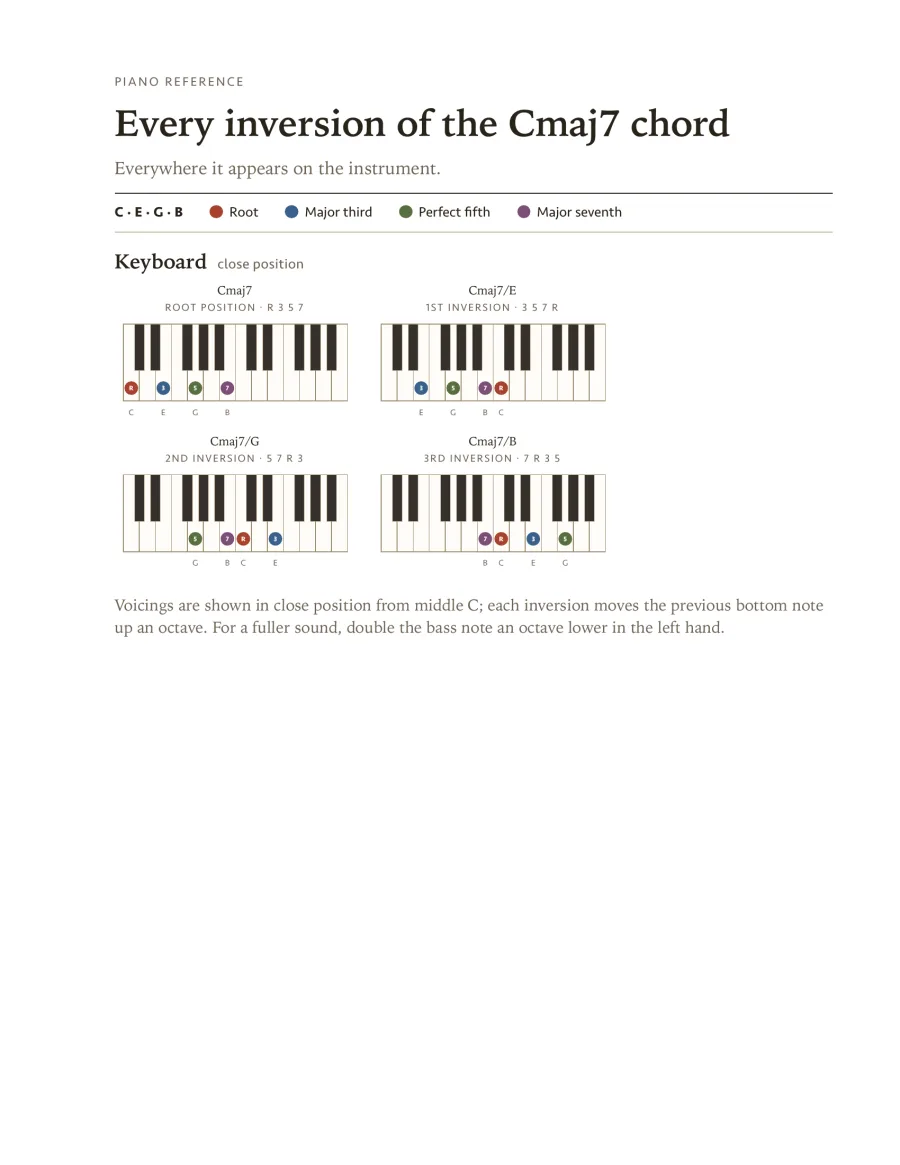
The same Cmaj7 sheet printed for piano, showing four inversions in close position.
Cmaj7 on pianoThe same sheet, for the keyboard.

Is that chord spelled right?

Nothing here is a scanned chord chart. Every dot is placed by counting intervals from the root against the tuning of the instrument you picked, and every note is spelled the way theory says it should be.

The third of F♯maj7 is A♯ and its seventh is E♯, because a maj7 stacks thirds, and the letters have to step F–A–C–E. Chord books and tab sites get this wrong routinely. It’s the kind of detail you don’t need until you do, and then you really do.

Drawing from the math instead of from a library is also why the app can grow: a new instrument is just a new tuning.

4××RF♯5C♯7E♯3A♯
F♯maj7
  1. F♯ Root 0 semitones from the root
  2. A♯ Major third 4 semitones from the root
  3. C♯ Perfect fifth 7 semitones from the root
  4. E♯ Major seventh 11 semitones from the root

Music Prism for Mac

For Mac laptops and desktops, not iPhone or iPad. Old-school macOS app. No login. No cloud. No demo mode, no ads, and nothing to sign up for.

Download for MacLaptops and desktops Visit this page on your Mac to download it. macOS 10.15 or later · No account needed

It’s signed and notarized by Apple. Drag it to your Applications folder and open it; after that, it’ll tell you when there’s an update.

Version 1.2.3 · 9.1 MB

At Home on the Mac

  • Light and Dark Mode. Warm paper by day and a warm dark page at night, following your Mac’s appearance.
  • VoiceOver. Every diagram describes itself, naming each chord tone, and Identify announces the chord it finds.
  • The keyboard. Every control is reachable, and in Identify the arrow keys walk the fretboard or the piano while Return marks a note.
  • Reduce Motion. The CAGED map changes its highlight without animation when Reduce Motion is on.
  • Zoom. Zoom In, Zoom Out, and Actual Size in the View menu (⌘=, ⌘−, ⌘0) enlarge the whole sheet to read from guitar distance, and the app remembers the size.
  • Printing. The Mac’s own print panel, with real page margins and extra room on the hole-punch side. Zoom never changes what prints.
  • Save as PDF. From the print panel, already named for the sheet you’re looking at.
  • Mac menus. Full Screen from the Window menu, and the Services, Hide, and Quit items every Mac app has.
  • Remembers where you were. The window reopens where you left it, at the size you left it, on the instrument, view, and chord you were last on.
  • Updates. Check for Updates… sits under About Music Prism, and the app checks on its own and tells you when there’s a new version.
  • Signed and notarized. Signed with an Apple Developer ID and notarized by Apple, so it opens like any other app.
  • Your mail app. Report a Bug or Request a Feature, in the Help menu, drafts the email in your own mail app for you to send. Every one is read.

Support

Questions, bugs, and ideas about Music Prism go to support@individuate.com. The support page answers the common questions first.

Support for Music Prism

Privacy

Nothing you look up leaves your Mac. The app sends a handful of anonymous usage signals, and nothing else.

Privacy policy

Particulars

MediummacOS, for Mac laptops and desktops
RequiresmacOS 10.15 or later
DistributionDirect download, signed and notarized; updates itself
AccountNone
Also atmusic-prism.com

Also in the collection